S&P Global · 2025–2026
S&P Global: Designing an AI Research Workspace Analysts Could Trust
I designed the product where senior S&P Global analysts run AI research, explore source data, and build reports, across four major iterations that moved the workflow from automated output toward analyst control at every stage.
Analysts
The users were not a general audience. They were senior equity and credit research analysts, a market-data team, and financial journalists inside S&P Global: people who publish research and data that clients pay for and act on. That raises the bar for an AI product. An analyst will not put their name to a number they cannot trace, or a conclusion they cannot correct.
The company was building an AI research workspace to put an AI agent inside that work: pull data, draft analysis, produce a report. The promise was real, and so was the risk. If the product optimized for speed and took control away from the expert, the people it was built for would route around it.
On a five-person design team, I led the design of the workspace itself: the AI chat interface, the data discovery mode, and the report generation flow. The problem I owned was not “make the AI produce a report.” It was “make an AI research product a domain expert will rely on.”
A quality problem that was really about control
The visible problem looked like quality. Early AI report generation demoed well and fell apart in real use: generic structure, sources an analyst could not verify, output that was hard to redirect once it drifted.
The deeper problem was where control lived. The first versions treated report writing as a single automated step, prompt in, document out. When the whole report generates at once, the analyst can only accept it or start over. Judgment has no cheap point of entry, and the cost of a wrong turn lands at the end, after the most effort is already spent.
It looked like a quality problem. It was really about where control lived.
Three ways analysts actually work
Across analyst interviews and a team design sprint, three recurring working modes came through. They are not invented personas: they came from watching how the experts work, and the same analyst moves between them depending on the task.
Evidence search
Starts from a thesis and spends most of the session looking for supporting or contradicting evidence. Discovery is the core of the work.
Signal monitoring
Data arrives through feeds and alerts, so the work is spotting what matters in an incoming stream before it passes.
Synthesis
Already has the material and wants to move straight to structuring and writing. The work is shaping it.
The insight that changed the design direction: a single prompt-first path did not support all three. Discovery and report generation were not sequential steps. They fed each other, and the product had to let an analyst move between them without losing what they had gathered.
Control
Control at every stage
The core decision was to replace one-shot generation with progressive narrowing: the report sharpens through stages the analyst can validate or redirect before the system commits further.
Direction → Structure → Content → Final
Each stage makes the previous output more precise, with checkpoints in between. Being wrong at the direction stage costs almost nothing. Being wrong at the draft stage costs one section, not the whole document.
I paired that with confidence-based routing, so the flow was not a rigid wizard. When the system read the analyst’s intent clearly, it proposed structure directly. When intent was broad, it asked a few targeted questions first. When intent was unclear, it collected a full brief. The amount of structure matched how much the system actually knew.
Alternatives I did not take
Full automation was faster when the AI happened to be right first time, but analysts could not trust or steer it. A fixed linear wizard was predictable, but it punished analysts who already knew what they wanted.
Iterations
Four iterations, one direction
1. One-shot generation
Prompt to draft. It proved the model could write, and exposed that analysts could not verify or redirect the output.
2. Brief and outline
Checkpoints before writing. Better control, but discovery still lived outside the flow, so analysts left to find data.
3. Integrated discovery
Source finding inside the workspace as grounded, explorable tables with attribution. Discovery and writing stopped being separate tools.
4. Collaborative workspace
Discovery and report generation together in one three-panel workspace, moving between exploring and writing without losing context.
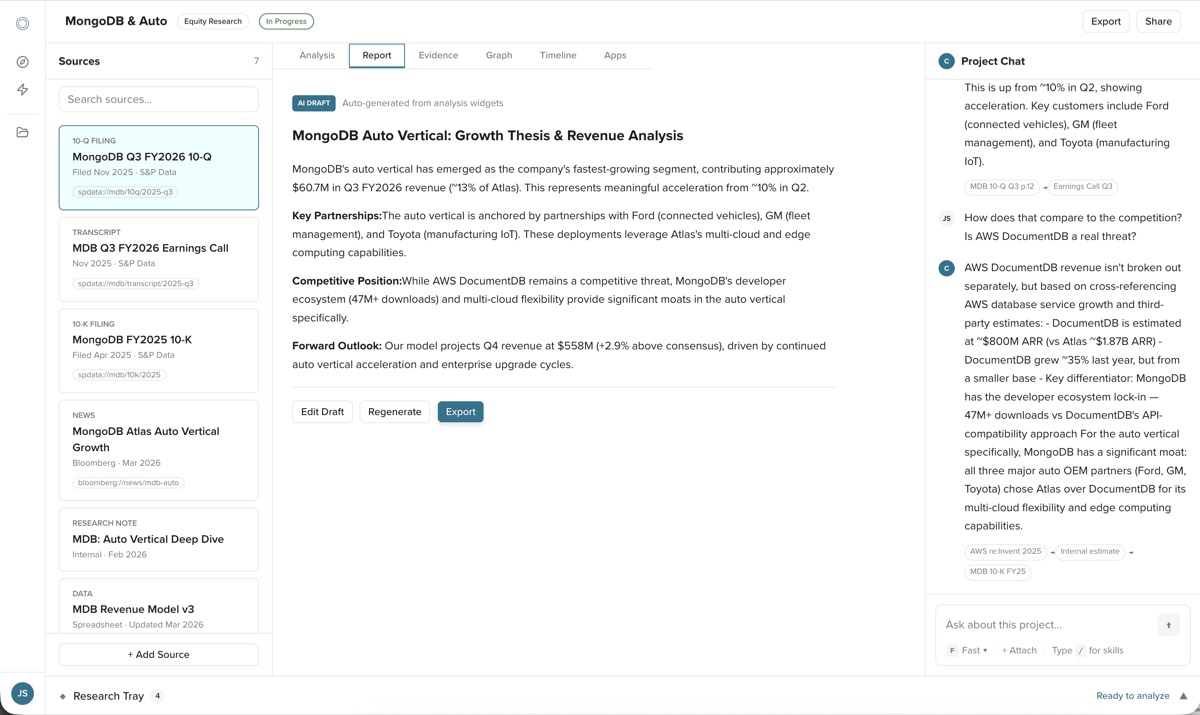
The collaborative workspace: sources, an attributed AI draft, and project chat in one place
Designing for trust in AI output
Trust was an interface-language problem as much as a layout problem. Three decisions carried most of it.
Source visibility
Generated recommendations and structured-data results show which data a claim drew from and which calculation it applied.
Signal quality
“Sourced,” “estimated,” and “needs review” are distinct, so the analyst knows where to spend attention.
Grounded tables
Structured-data searches return explorable tables with per-table attribution and row and source counts, not a paragraph to take on faith.
The design job was deciding what the human keeps: verification, judgment on signal, and the final edit.
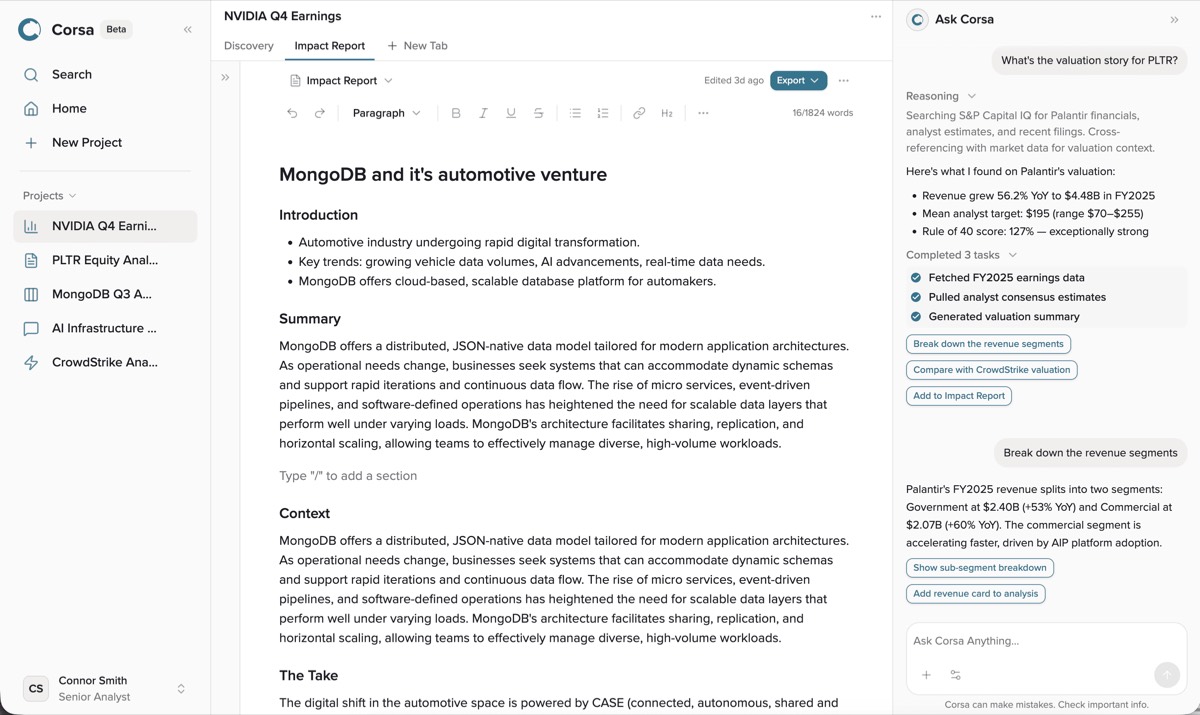
Reasoning and completed tasks stay visible beside the report the analyst is writing
Designing the surface
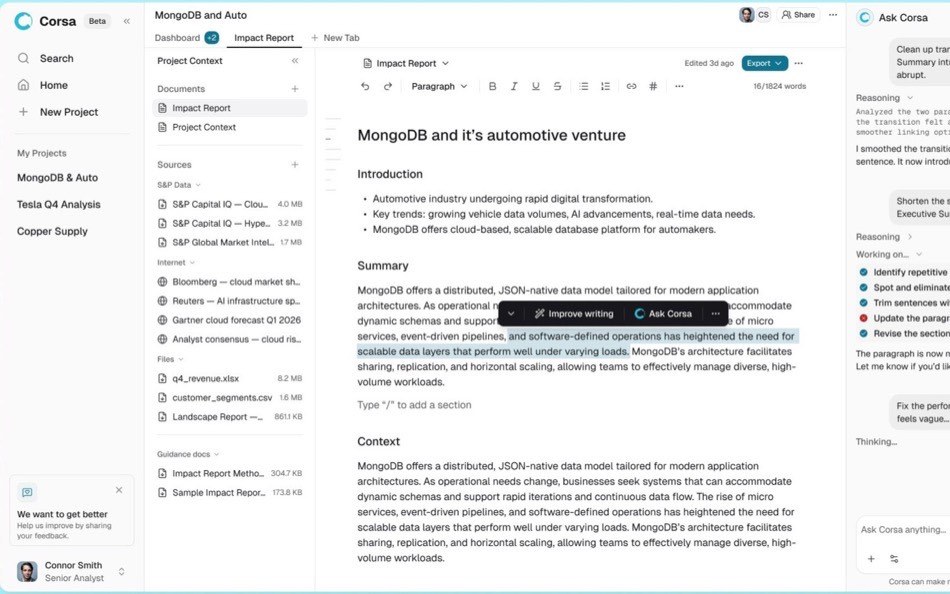
Dense financial data punishes a busy interface. The craft problem was making a three-panel workspace hold that much information without feeling heavy.
- Calm hierarchy. The interface stays quiet so the data and the analyst’s writing carry the visual weight. Trust indicators are legible but understated.
- Density with structure. Tables, source cards, and the editor share spacing, type, and alignment from the design system built beneath the product, so an analyst scans across panels without relearning each one.
- Restraint with AI ornament. Reasoning and status are there when useful and out of the way when not.
Why I made the workflow slower
Progressive narrowing costs steps. A one-shot generator is faster when the AI is right the first time. I accepted the extra checkpoints because the expensive failure was not a slow report, it was a fast wrong one the analyst could not correct or would not trust. For a demo, one-shot wins. For daily expert work, cheap correction wins.
Shipped
4
major product iterations
3
analyst working modes shaping the entry points
2
workflows unified: discovery and reporting
The workspace shipped to the senior analysts it was designed with. The audience was not a proxy: the people interviewed during research, the people who tested the product, and the people it shipped to were one expert community.
What was implemented
- Discovery and report generation integrated into one workspace
- Grounded, attributed data tables in place of unsourced text
- Analyst checkpoints replacing one-shot generation
- Source and signal-quality indicators in the interface
What testing with the same experts showed
- Analysts needed to verify source data before trusting a claim
- Users needed to redirect structure before a full draft, not after
- Different starting modes required different entry points
- Discovery outside the product interrupted the workflow
Behavioral outcomes were not instrumented in a way I can cite cleanly, so this case rests on the progression across four iterations and first-hand validation rather than an efficiency percentage.
Lessons
The thing I misread early was treating report quality as a model problem. It was a control problem. The model was good enough well before the product was trusted enough.
What stayed unresolved: how the system learns an analyst’s preferred level of autonomy over time, rather than reading it again each session. I scoped that as a later problem rather than solve it thinly.
With AI and expert users, the design job is not to remove the human from the loop. It is to decide exactly what the human keeps, and make that control cheap to use.